¶ Introduction
The logger is a software for data acquisition. It collects data from specific variables while you are driving. Logging is a process used for fine-tuning or troubleshooting an ongoing issue
This can be a crucial part of tuning and this is usually a tedious process for neophyte. We provide a simple tool that require minimal configuration on your end
¶ Requirements
In order to use the logger, you will the following:
Once the application has been initialized, the internet connection is no longer required.
¶ Getting started
¶ Download the application

¶ Initial configuration
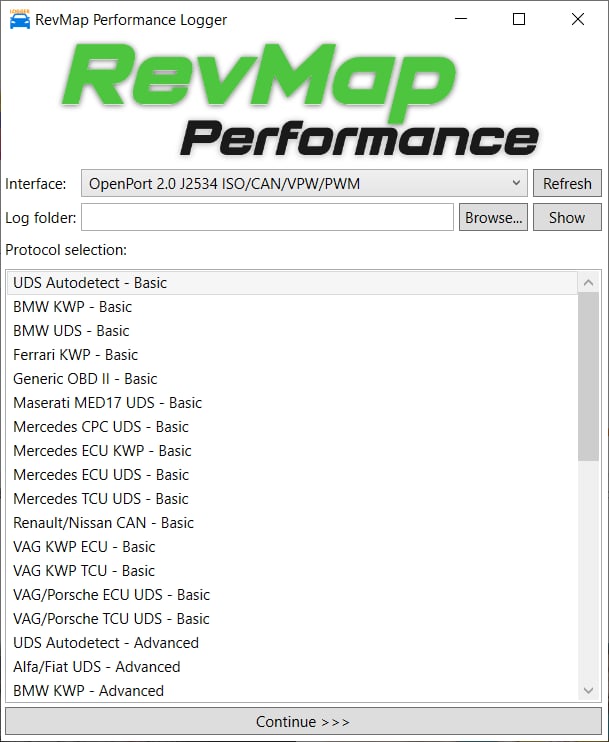
Interface: Select the OpenPort 2.0
Log folder: This is the location where your logs will be saved on your laptop
Protocol selection: By default (except if indicated otherwise), select VAG KWP ECU - Basic
You can now click on Continue > > >
¶ ECU identification, logging request
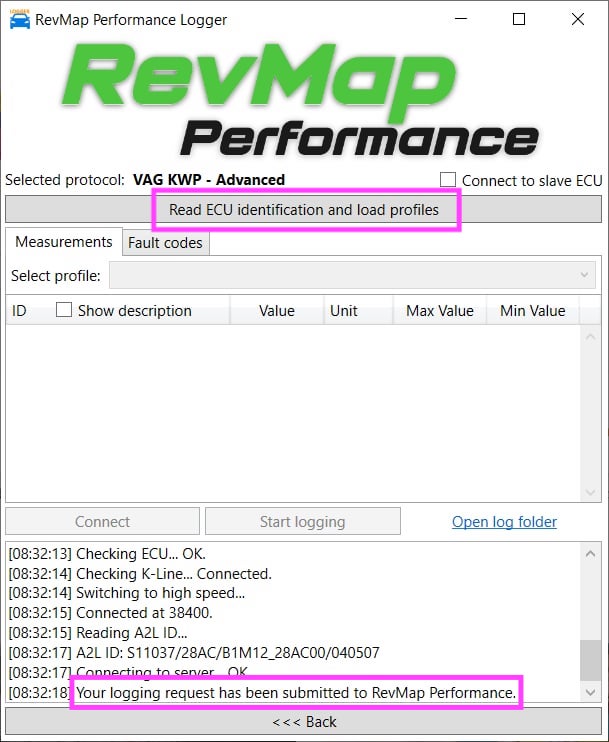
Once you have selected the protocol, you need to Read the ECU identification. This send a logging request with all the information required about your ECU
We can then create a profile (preset) with predefined variables for your specific case
Logging will be available once we have accepted your request
You can now start recording logs